






 |
 |
 |
|
 |
 |
 |
Changing International Months and Days in the Date & Time Control Panel Alvaro Amorim sent an email requesting the following:
Yes it is. To test this edit, I did a fresh System install on an extra partition. After rebooting, the Setup Assistant asked me to pick a region and I chose "Brazilian Portuguese".
When I launched the Date & Time control panel, under Date formats, at the bottom of the window, I saw the source of Alvaro's problem. The months were all lower case.
This problem is also visible in Finder windows when viewing the Date Created or Date Modified preference.
 Those strings containing the names of the months are stored in the System suitcase. Those strings containing the names of the months are stored in the System suitcase.
Open a copy of the System Suitcase and find itl1 resources. Open them with a double-click.
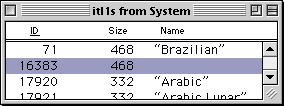 At first, it looks like ID 71 is what we may be looking for, but in reality, the Brazilian Portuguese settings are in ID 16383. At first, it looks like ID 71 is what we may be looking for, but in reality, the Brazilian Portuguese settings are in ID 16383.
Open ID 16383 with a double-click.
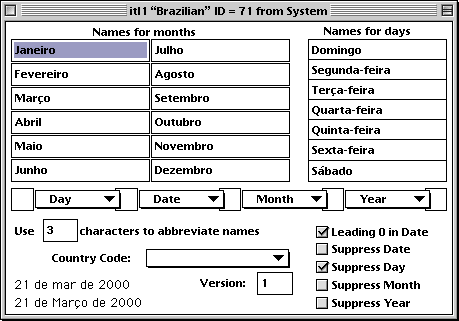
Below in the window containing the corrected names of the months. For extra credit, I also did the days of the week. After making the changes, save your work and quit ResEdit.
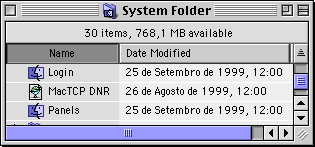 Replace the original System suitcase with the modified one and restart the computer. Replace the original System suitcase with the modified one and restart the computer.
As shown in the Finder window on the left, the names have been changed. If you use this edit to modify any other international settings, please drop me a note and I'll add the information to this tutorial.
|
 |
|
 |
 |
 |
|
 |



 |
 |
 |
||||||||||||||||||||||||||||||
 |
|
 |
||||||||||||||||||||||||||||||
 |
 |
 |
Maintained by the Staff of ResExcellence. This entire site ©1997-2006 ResExcellence
Privacy Statement? Sure we gotta Privacy Statement.
[an error occurred while processing this directive]