






 |
 |
 |
|
 |
 |
 |
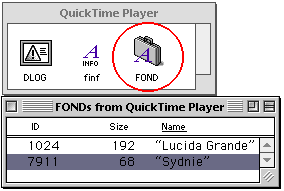
Extract Fonts from an Application for use System-wide by Michael Coyle Applications can contain their own exclusive font resources. They can't be accessed by other applications. For example, Quicktime Player 5 uses a font called Sydnie for some text items and the position counter. In this tutorial, I'll show you how to extract the font for placement in the System's Font Folder. It will then be available to all applications. Launch ResEdit and create a new document named Sydnie. From the File menu, select "Get Info for this file". Change the file type to FFIL and the Creator to DMOV. Congratulations you just created an empty font suitcase. Let's find a font to put in there! Open a copy of the Quicktime Player 5 in ResEdit and find the FOND resource. Open it with a double-click and notice the two font names: Lucida Grand and Synie. Click once on ID 7911 (Sydnie) and copy it to the clipboard.
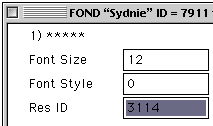
Now switch to your new and empty Sydnie window and paste in the FOND. Switch back to the Quicktime window and double-click on the Sydnie FOND to open it. Scroll down to the bottom and find the item that describes the font properties. Notice the Res ID 3114. That tells us which NFNT resource we need to add to make our font work. Jot down the number and close all the FOND windows in the Quicktime Player.
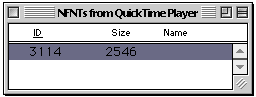
Scroll around the Quicktime Player resources and find NFNT. Open them with a double-click. In there is ID 3114. Click on it once to select and then copy it to the clipboard. Your are now done with the Quicktime Player. Close all of its windows.
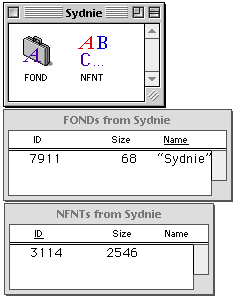
Switch to the Sydnie resource window and paste in the NFNT resource from the clipboard. Your window should now contain the items shown below.
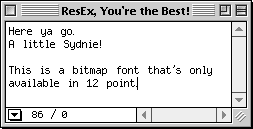
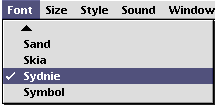
Save your work in Sydnie and quit ResEdit. Add the new font to the System Font Folder and check it out in a word processor.
|
 |
|
 |
 |
 |
|
 |



 |
 |
 |
||||||||||||||||||||||||||||||
 |
|
 |
||||||||||||||||||||||||||||||
 |
 |
 |
Maintained by the Staff of ResExcellence. This entire site ©1997-2006 ResExcellence
Privacy Statement? Sure we gotta Privacy Statement.
[an error occurred while processing this directive]