






 |
 |
 |
|
 |
 |
 |
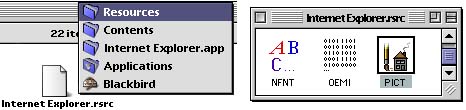
Change Internet Explorer's Throbber. by Michael Coyle Alex asks, "Is it possible to change the throbber of MacOS X's Internet Explorer?" Well, heck yeah! We don't collect splash screens and throbbers for nothin'! Like so many other applications under MacOS X, Internet Explorer no longer stores ResEdit resources in the usual places. In this case, they are in a file called, cleverly enough, Internet Explorer.rsrc.
To gain access to the Resource folder shown above, Control-Click the Internet Explorer application and select "Show Package Contents". After locating the Internet Explorer.rsrc file in the Resources folder, drag it onto QuickConvert to move the ResEdit resources back to their original location. You can now open the file in ResEdit and see all the old familiar icons. The Throbber is still in PICT ID number 165. Open the replacement Throbber in ResEdit and copy the PICT resource, then paste them into the Internet Explorer.rsrc file, When finished, drag Internet Explorer.rsrc back onto QuickConvert to move the resources back to their original location.
|
 |
|
 |
 |
 |
|
 |



 |
 |
 |
||||||||||||||||||||||||||||||
 |
|
 |
||||||||||||||||||||||||||||||
 |
 |
 |
Maintained by the Staff of ResExcellence. This entire site ©1997-2006 ResExcellence
Privacy Statement? Sure we gotta Privacy Statement.
[an error occurred while processing this directive]