






 |
 |
 |
|
 |
 |
 |
Change Mozilla's Throbbers
Update 2: Tuesday January 20th, 2004 I found your site from a dogpile.com search (it's the best I think) for changing Mozilla's throbber. The code you have is missing the 2nd part for the F11/Fullscreen mode. So I'm enclosing the entire code for your readers. /* Do not remove the @namespace line--its required for correct functioning */ Thanks Caetck!
Update: Monday December 30th, 2002 "I was looking at the page that instructs how to change the Mozilla throbber. There is actually an easier way that allows users to modify their throbber without any unzipping or having to go into the main Mozilla folder and change application data. The following works flawlessly. It also has the benefit of surviving updates to the program and allowing non-admin users (in OS X) to change their own throbbers."
The files "throbber-single.gif" and "throbber-anim.gif" are the stopped and animated throbbers, respectively, and should also be placed loose inside the chrome folder. The sample file, userChrome-example.css, includes a link to this page where you can read other hints and tips!
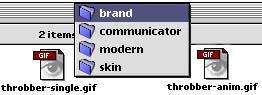
Original Mod Article: February 25th, 2002 At first glance, it looks as if modifying the appearance of Mozilla is daunting task, but once you turn the key and open the door, you can customize any aspect of this XUL rendered browser. For starters, let's change the throbber. Mozilla ships with two skins that can be selected from the View-->Apply Theme menu: Classic and Modern. I prefer the latter, so we can start by making a copy of the theme file, located in the Chrome folder in the Mozilla application folder. Find modern.jar and make a copy of it. This file is a zip archive containing all the images used to render the look of the Mozilla skin. If you need a Zip/UnZip utility, you can take your pick from a VersionTracker listing. After unzipping the copy, you are left with a folder titled skin. Work you way down to the folder called brand as shown below.
There are two GIF images in the brand folder: the "At Rest" throbber and the animated throbber. Using your favorite graphics application you can create your own, or (lucky for Mozilla users) all of the preview images of the Explorer throbbers in the ResExcellence archive are animated gifs that will drop right into the brand folder! You just need to pick a frame and make a single gif of it. If you are the adventurous type, browse the folders and images with in the Modern skin and you will learn you can customize any aspect of the browser's appearance. Mozilla provides a tool to make this easier, but unfortunately, given the rapid pace of Mozilla development, the theme tool has lagged behind.
|
 |
|
 |
 |
 |
|
 |




 |
 |
 |
||||||||||||||||||||||||||||||
 |
|
 |
||||||||||||||||||||||||||||||
 |
 |
 |
Maintained by the Staff of ResExcellence. This entire site ©1997-2006 ResExcellence
Privacy Statement? Sure we gotta Privacy Statement.
[an error occurred while processing this directive]