






 |
 |
 |
|
 |
 |
 |

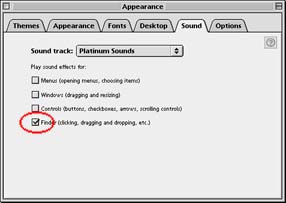
Replace the Voice Login Sound Effect in Mac OS 9 If you are running Multiple Users and voice passwords, here are some specifics on when you will hear the drum roll sound effect for a successful voice match. In order to hear the sound, under the Appearance Control Panel > Sounds, a Sound Track must be selected, and the sounds for the Finder must be checked. It doesn't matter what the name of the Sound Track is, nor if the other three boxes are checked. It doesn't matter what your login phrase is. The login sound is only tied to the Finder check box.
How to Change the Login Sound
The SND resource containing the sound ID is located in the Voice Verification extension in the System Folder. Open a copy of the this in ResEdit and find the SND resources. Open them with a double-click.
There is only one ID, number 500. To eliminate the login sound, simply delete this ID and save the extension. If you would like to replace it with another found, open a System 7 type sound file in ResEdit, copy the ID, paste it into the Voice Verification extension. At this point, you will have two SND ID numbers: the original (500), and the new one. Delete 500 and with a single click, select the remaining ID. From the Resource menu, select Get Resource Info and change the ID number to 500. Save your work and quit ResEdit. Replace the old extension and restart the computer. The next time you login with a voice print, your new sound effect will play.
|
 |
|
 |
 |
 |
|
 |




 |
 |
 |
||||||||||||||||||||||||||||||
 |
|
 |
||||||||||||||||||||||||||||||
 |
 |
 |
Maintained by the Staff of ResExcellence. This entire site ©1997-2006 ResExcellence
Privacy Statement? Sure we gotta Privacy Statement.
[an error occurred while processing this directive]