






 |
 |
 |
|
 |
||
 |

Articles 3D Audio Custom Controls General RB Graphics Hacks Mac OS X Menus Novelty Printing REALbasic 2005 REALbasic 2006 Registration Resources Reviews Serial Speech Sockets XML Video Resource Links News Current News February 2006 January 2006 December 2005 November 2005 October 2005 September 2005 August 2005 July 2005 June 2005 May 2005 April 2005 March 2005  REALbasic for Dummies by Erick Tejkowski  Learning REALbasic through Applications REALbasic for Macintosh REALbasic Cross-Platform Application Development 
Older files are in Stuffit 5 or greater format. Newer files are ".Zip". Download StuffIt Expander |

|
 
As we slowly bid farewell to the classic Mac OS, we'll take one last poke at the venerable Extension. This week we'll show you how to whip up a handy Extension with REALbasic. Build the Interface and Add the Code This week's project is drop dead simple to complete. Launch REALbasic and open Window1. To this window, add a Timer control (Mode = 2; Period = 10). By now, you interface might look like this: 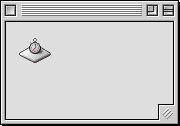
Next, double clik the Timer control and enter this code: 
This code continually checks for a user to press Option-a. If they do, it moves the mouse cursor to the upper left hand of the screen (hopefully in proximity to the Apple menu for easy clicking). Wait a second! REALbasic doesn't have a moveCursor command. To add the command to your project, download this XCMD resource and drag it into your project window. Finally, we want to hide the window while this "application " runs. Normally extensions don't have interfaces and this is how we get around that problem with the interface-centric REALbasic. Add this command to the Open event of Window1 to hide the window: me.top=-500That's it. Run the project to see how it works. Once you've tested it to your satisfaction, build the final application (Sorry, no Carbon allowed on this one.). Convert an Application into an Extension OK, now you've got an application staring at you. How do you make it into an Extension? Simple. Open the application with ResEdit and changes its type to 'appe'. 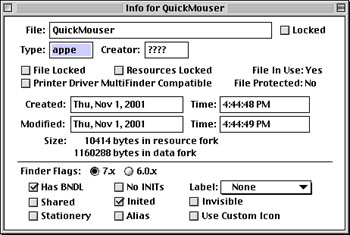
Then, open the 'SIZE' resource and click '1' for the Only background option. 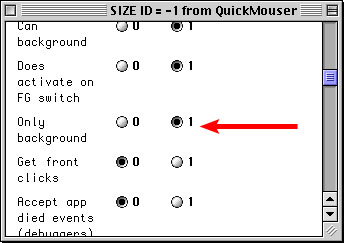
Close the file and save it. Voila! It's an extension now. Drop the new extension in your Extensions Folder and reboot your Mac to check it out. Conclusion If you'd like to download this week's example instead of typing it in, you can download the completed project. See you next week! |
 |
||
 |
 |
 |
|
 |




 |
 |
 |
||||||||||||||||||||||||||||||
 |
|
 |
||||||||||||||||||||||||||||||
 |
 |
 |
Maintained by the Staff of ResExcellence. This entire site ©1997-2006 ResExcellence
Privacy Statement? Sure we gotta Privacy Statement.
[an error occurred while processing this directive]