






 |
 |
 |
|
 |
||
 |

Articles 3D Audio Custom Controls General RB Graphics Hacks Mac OS X Menus Novelty Printing REALbasic 2005 REALbasic 2006 Registration Resources Reviews Serial Speech Sockets XML Video Resource Links News Current News February 2006 January 2006 December 2005 November 2005 October 2005 September 2005 August 2005 July 2005 June 2005 May 2005 April 2005 March 2005  REALbasic for Dummies by Erick Tejkowski  Learning REALbasic through Applications REALbasic for Macintosh REALbasic Cross-Platform Application Development 
Older files are in Stuffit 5 or greater format. Newer files are ".Zip". Download StuffIt Expander |

|
 
This week we'll go on a mind-bending trip into the realm of audio illusions. Using a few simple commands and an interface that you can build in minutes, we'll look at, er listen to, an unusual audio phenomenon, made famous by Roger Shepard. Background The renowned scientist, Roger Shepard, figured out a neat audio trick that involves a sequence of musical tones. When played in succession, these notes seem to forever increase in pitch, though they aren't really doing so. Some have termed it an "audio barber pole". Whatever you call it, it's pretty weird (and I know how much ResEx readers like weird). So, this week we'll put together a simple project that demonstrates this nifty trick. Build the Interface Launch REALbasic and open the default window: Window1. Add the following controls to the window:
Arrange the interface however you wish, but it might look like this: 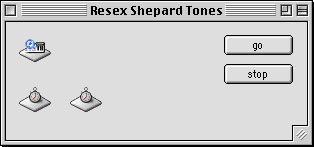
Add the Code With our interface built, double click the Window Editor to open the Code Editor. Select Edit-New Property and create two new properties: 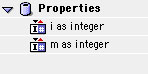
Next navigate to the Action event of PushButton1 and enter the following code: 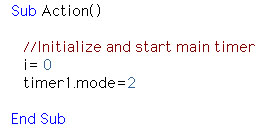
Then, navigate to the Action event of PushButton2 and enter this code: 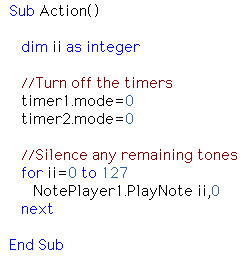
To the Action event of Timer1 add this bit of source code: 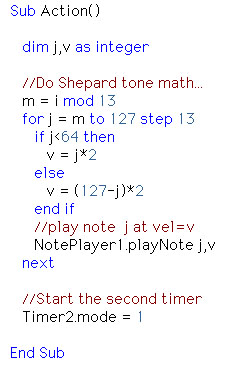
Finally, type this code into the Action event of Timer2: 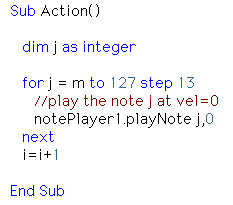
Conclusion When you're done, select Debug-Run to hear the mysterious rising tones. If you'd like to download this week's example instead of typing it in, you can download the completed project. See you next week! |
 |
||
 |
 |
 |
|
 |




 |
 |
 |
||||||||||||||||||||||||||||||
 |
|
 |
||||||||||||||||||||||||||||||
 |
 |
 |
Maintained by the Staff of ResExcellence. This entire site ©1997-2006 ResExcellence
Privacy Statement? Sure we gotta Privacy Statement.
[an error occurred while processing this directive]