
What would Valentine's Day be without a valentine from your friends at ResExcellence? This week we'll look at how to make an electronic valentine with REALbasic.

Build the Interface
Launch REALbasic, open Window1, and add a Canvas and Timer control to the window. Give the Canvas dimensions of 202 x 196. Set the Timer's Mode to a value of 2 and Period to 500. Download this flickerFreeCanvas class and drag it into your project. Then, change the Super property of the Canvas in Window1 to flickerFreeCanvas.
Next, create a black and white image of a heart shape. If you aren't a good artist, you can download one here. Drag the image into your REALbasic project. Note that the image file I am using for this example is named "heartblack".
Add the Code
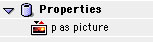
Double click Window1 to open its Code Editor. Select Edit-New Property and create a new picture property, named p.
Finally, navigate to the Action event of Timer1 and add this code
dim c as colorConclusion
You can download the finished product if you don't feel like recreating the project. Happy Valentine's Day and see you next week!