image ResEx Logo
ResExcellence www : Powered by Google
Cell Phone Themes Icons Mighty Mouse Cursors Software Reviews Widgets & Widgets

Articles
   3D
   Audio
   Custom Controls
   General RB
   Graphics
   Hacks
   Mac OS X
   Menus
   Novelty
   Printing
   REALbasic 2005
   REALbasic 2006
   Registration
   Resources
   Reviews
   Serial
   Speech
   Sockets
   XML
   Video
Resource Links
News
   Current News
   February 2006
   January 2006
   December 2005
   November 2005
   October 2005
   September 2005
   August 2005
   July 2005
   June 2005
   May 2005
   April 2005
   March 2005


REALbasic for Dummies
by Erick Tejkowski


Learning REALbasic through Applications
by Clayton E., Crooks II


REALbasic for Macintosh
by Michael Swaine


REALbasic Cross-Platform Application Development
by Mark S. Choate


Older files are in Stuffit 5 or greater format. Newer files are ".Zip". Download StuffIt Expander
Tell us about a bad link. Thank You!

Making Masks Smarter by Seth Willits
07-24-04

Printer Version


Field Formatting and Masking
In REALbasic 5.5 two new features were added to the Editfield class, Format and Mask. These properties allow the developer to specify how the data entered into the field should appear and what data is allowed in the field respectively. I was working on a project a number of weeks ago that needed a field for a phone number allowing an optional extension. I worked on figuring out which of the two new properties was appropriate and how to use it, and I came to the conclusion that they both stunk. The format property can be accepted as-is, but the Mask property could be me much much more useful if it had a more RegEx-style definition syntax and allowed optional phrases rather than one static entry. What I came to find was that if you do some clever coding and change the Mask multiple times while the user is entering data into the field, you can customize the behavior to be exactly how one would want it: never obtrusive and always helpful.


The Design
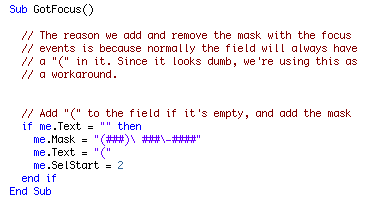
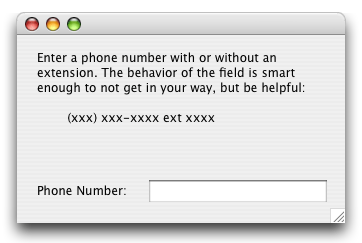
The general idea is that when the user enters the field for the first time, we set the mask to account for just a phone number "(###)\ ###\=####" and then also set the field's test to the opening paren. This way the user doesn't have to type it, and it should be immediately apparent that an area code is needed.


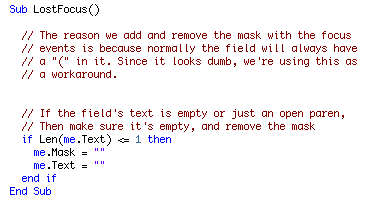
If the user was then to leave the field without having typed anything so it merely contains the opening paren, we remove it:


From then until the phone number is finished being entered, we don't do any coding. Instead, we wait until the entire phone number is entered and wait for the next character to be pressed. You might expect the KeyDown event to be used for this however, the KeyDown event is only fired if a valid character is pressed, and if the entire phone number has been entered, the next character pressed will be invalid.

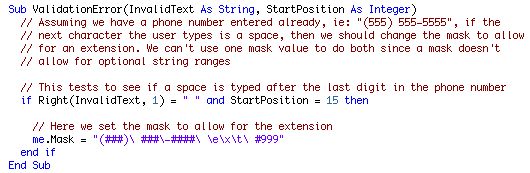
So in the ValidationError event, we check to see if the key being pressed after the end of the phone number is a space, and if it is, we assume the user wants to add an extension to the phone number so we change the mask to allow an extension to be entered. Changing the Mask here automagically fills in the "ext " for us letting the user simply type the extension number.


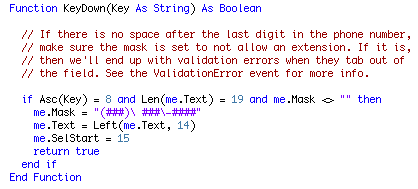
What the KeyDown event does is determine if the delete key was pressed to delete the space immedately after "ext". We assume that if that character is deleted, the entire extension portion should be deleted, so we change the mask to allow only a phone number, set the text to just the phone number, and then return true so the delete doesn't take place.


Finished
I think the Format and Mask properties were great extensions to the EditField class, but I really do believe that Masks aren't nearly as useful as they could be without a better syntax. As demonstrated here, you can do a small bit of clever coding to use them better, but it's only just a few more lines of code to not use the mask at all. Anyway, I hope this is useful to you all. As always, you can download the project here.


Cell Phone Themes Icons Mighty Mouse Cursors Software Reviews Widgets & Widgets

Maintained by the Staff of ResExcellence. This entire site ©1997-2006 ResExcellence
Privacy Statement? Sure we gotta Privacy Statement. [an error occurred while processing this directive]