






 |
 |
 |
|
 |
||
 |

Articles 3D Audio Custom Controls General RB Graphics Hacks Mac OS X Menus Novelty Printing REALbasic 2005 REALbasic 2006 Registration Resources Reviews Serial Speech Sockets XML Video Resource Links News Current News February 2006 January 2006 December 2005 November 2005 October 2005 September 2005 August 2005 July 2005 June 2005 May 2005 April 2005 March 2005  REALbasic for Dummies by Erick Tejkowski  Learning REALbasic through Applications REALbasic for Macintosh REALbasic Cross-Platform Application Development 
Older files are in Stuffit 5 or greater format. Newer files are ".Zip". Download StuffIt Expander |

|
 
Multiple Menu Bars So the solution is simply to swap menu bars. When one kind of document is active, it uses a certain set of menus, and when it switches to a document of another kind, it removes the old menus and adds the menus appropriate for the current document type. For a long time this wasn't possible in REALbasic, but in 5.0 REAL Software redesigned the menu system and allowed us to do this.
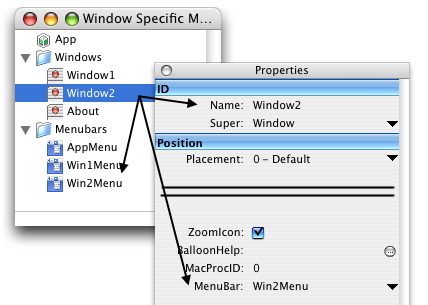
How it Works There are two places to do this though. Both the Application class and Window class have a "MenuBar" property (of type "MenuItem" which is how menu bars are represented). If you want the new menu bar to be used for the entire application (when there are no windows open, and when any one of any of the open windows are active) then you set App.MenuBar to the new menu bar. If you want the menu bar to be specific to a certain window (like the currently active one) you can set the Window's MenuBar property.
You can also either do this at runtime or at design time. If you were writing an AppleWorks-like program that had multiple document types, you could simply set the MenuBar property to the appropriate menu bar inside of the IDE at design time. Looking at the example above, any instances of Window2 (lets say it was our drawing "program") would automatically use the "drawing" menu bar Win2Menu. If you do the same for Window1 and have it use Win1Menu as its menu bar, when switching between two documents of different types, it would switch the menu bar for you. Also, the App instance has it's own menu bar. Since all of the windows have their own menu bars, what you need to do is give one to the Application as well so that it knows what menu you want to use if their are no windows open. Menu Handlers and enabling menu items and all of that same way as they did before.
Finished
|
 |
||
 |
 |
 |
|
 |




 |
 |
 |
||||||||||||||||||||||||||||||
 |
|
 |
||||||||||||||||||||||||||||||
 |
 |
 |
Maintained by the Staff of ResExcellence. This entire site ©1997-2006 ResExcellence
Privacy Statement? Sure we gotta Privacy Statement.
[an error occurred while processing this directive]