 |
|

|
Snippets and Goodies
For today's article I decided it's be good to share a couple of little goodies I have. There isn't one big project, but instead I'll show you a couple of little things I like to use in my projects.
A Better Listbox.AddRow
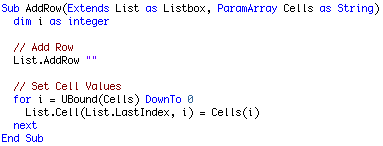
One problem I've always had with the AddRow method in the Listbox control is that there is no way to add a row and fill all of its columns with a single line of code. In the past, you coul make a subclass and possibly create an AddRowAndCols method that took so many strings, or an array, or something, but none of that was elegant, and it still wouldn't reduce the code to a single l ine. Thanks to some greate enhancements in the last few versions of REALbasic (RB 5 and 5.5), we can now extend the Listbox class (any class at all really, with the same syntax) by creating a method named AddRow (we can overload this method!) and pass a variable amount of strings as parameters, NOT an array, and easily do exactly what we want. Using the method below (place it in a module) we can do any of the following:
Listbox1.AddRow "Seth", "wants", "an", "iPod!"
Listbox1.AddRow "For", "Christmas"
Listbox1.AddRow "This"
Listbox1.AddRow "Year"
And it will add a row to the listbox and fill the appropriate amount of columns. Even if you pass more strings than there are columns, it'll still work, so there's no need to have any error handling. Just a little note.
String Truncating
I believe this is on my website, but it's pretty cool, so let's put it here too. :^) This module contains two methods, TruncateString(g as Graphics, s as String, width as Integer, where as Integer) as String, and TruncateString(s as String, width as Integer, where as Integer) as String. Both methods take a String and truncate it to a specific width, either based on pixels (in the first method) or by characters (the second method). The Where parameter allows the caller to specify whether the text should be truncated at the middle or at the end. These are very handy methods for having to print within a certain width like in columns or fit text within a StaticText field. I use them enough that they're in my standard default project.
Highlight Colors
Another module I have contains two methods for returning colors based on the system appearance. In Mac OS X you may have noticed that there are three highlight colors rather than just one. There's the standard HighlightColor which is the color of text selections, there's the SecondaryHighlightColor which is the color text selections turn when they're inactive, and then there's the visually more important one, AlternatePrimaryHighlightColor, which is the darker/bolder color that is used for selections in lists. This is the color used in applications such as Mail, iTunes, and every Cocoa application, and properly designed Carbon application. So these two methods (AlternatePrimaryHighlightColor and SecondaryHighlightColor) give you access to those colors, which comes in real handy when creating custom controls.
Preferences
The last module I have is a simple way to add preferences to your application. Not only does it just work wonderfully, but it is also forwards and backwards compatible with all versions of your application. It works off a simple key-value system, but is stored in a binary format. Basically, you add your default preferences to a dictionary, then the user's values are read from disk and put into the same dictionary. The application uses and changes the preferences in the dictionary through the time it's open, and when it shuts down, all of the preferences in the dictionary are written to disk. It's very simple and works very well. It handles colors, booleans, strings, and numbers.
Finished
I'm sure you'll a mix of these little goodies useful in your projects. I've used every one of them multiple times, and I think they're awesome. As always, you can download the project here.
|
 |



















