image ResEx Logo
ResExcellence www : Powered by Google
Cell Phone Themes Icons Mighty Mouse Cursors Software Reviews Widgets & Widgets

Articles
   3D
   Audio
   Custom Controls
   General RB
   Graphics
   Hacks
   Mac OS X
   Menus
   Novelty
   Printing
   REALbasic 2005
   REALbasic 2006
   Registration
   Resources
   Reviews
   Serial
   Speech
   Sockets
   XML
   Video
Resource Links
News
   Current News
   February 2006
   January 2006
   December 2005
   November 2005
   October 2005
   September 2005
   August 2005
   July 2005
   June 2005
   May 2005
   April 2005
   March 2005


REALbasic for Dummies
by Erick Tejkowski


Learning REALbasic through Applications
by Clayton E., Crooks II


REALbasic for Macintosh
by Michael Swaine


REALbasic Cross-Platform Application Development
by Mark S. Choate


Older files are in Stuffit 5 or greater format. Newer files are ".Zip". Download StuffIt Expander
Tell us about a bad link. Thank You!

Drawing Dashed Lines by Seth Willits
01-08-05

Printer Version


Drawing Dashed Lines
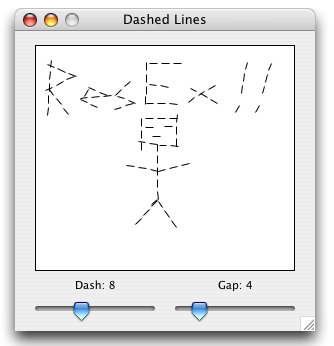
This topic came up on REAL Software's Getting Started mailing list a few weeks ago and I posted a solution that I wrote in a few minutes. The downside was, I realized it was wrong but in my limited testing I didn't catch it. Anyway, here's a correct version that works correctly and builds such beautiful artwork as shown below!


A Dashed DrawLine Method
The implementation of the DrawLine method will be extended by adding the following method to the Graphics class by placing it in a global module. There are two additional parameters, dash, and gap. Dash is the length of the line segments, and gap is the space between them. So 8, 4 would be 8 pixel long lines, and 4 pixel gaps in between. Here's the code:


Sub DrawLine(Extends g as Graphics, x1 as integer, y1 as integer, x2 as integer, y2 as integer, dash as integer, gap as integer)
   dim x, y, angle as Double
   dim xStep, yStep, lineStep as Double
   dim xDash, yDash as Double
   dim steps, iter as integer


   // Length of Entire Pattern and Line
   lineStep = dash + gap

   // Angle Of Line
   angle = atan2(y2 - y1, x2 - x1)

   // Component Lengths of the Pattern and Dash
   xStep = cos(angle) * (lineStep)
   yStep = sin(angle) * (lineStep)
   xDash = cos(angle) * dash
   yDash = sin(angle) * dash

   // Initial Coordinates
   x = x1
   y = y1

   // Number of Dashes to Draw (length of line / length of pattern)
   steps = sqrt((x2 - x1) * (x2 - x1) + (y2 - y1) * (y2 - y1)) / lineStep

   // Draw Dashes
   for iter = 0 to steps
      g.DrawLine x, y, x + xDash, y + yDash
      x = x + xStep
      y = y + yStep
   next
End Sub


What we do is find the length of the line, and count the number of dash-gap patterns will fit into it, loop that many times, and draw a line segment at the beginning of each of those pattern offsets, which are calculated by moving down the length of the line by adding the component (x and y seperately) lengths of the dash and gap added together. It's actually quite a simple idea, though it doesn't always yield peeerfect results. Sometimes the segments can appear to be at a slight angle from the slope of the line they're supposed to be building. This is simply a limitation of the DrawLine method. If we used a true pen pattern like from QuickDraw, we would no longer have cross-platform abilities, but it would work better on the Mac.

Finished
So there you have it. Here's a quick and easy way to add dashed lines to whatever kind of drawing you're trying to do. It doesn't work as well as a true pen pattern would, nor as efficiently, but for a pure RB implementation, it works! As always, you can download the project here.


Cell Phone Themes Icons Mighty Mouse Cursors Software Reviews Widgets & Widgets

Maintained by the Staff of ResExcellence. This entire site ©1997-2006 ResExcellence
Privacy Statement? Sure we gotta Privacy Statement. [an error occurred while processing this directive]