






 |
 |
 |
|
 |
||
 |

Articles 3D Audio Custom Controls General RB Graphics Hacks Mac OS X Menus Novelty Printing REALbasic 2005 REALbasic 2006 Registration Resources Reviews Serial Speech Sockets XML Video Resource Links News Current News February 2006 January 2006 December 2005 November 2005 October 2005 September 2005 August 2005 July 2005 June 2005 May 2005 April 2005 March 2005  REALbasic for Dummies by Erick Tejkowski  Learning REALbasic through Applications REALbasic for Macintosh REALbasic Cross-Platform Application Development 
Older files are in Stuffit 5 or greater format. Newer files are ".Zip". Download StuffIt Expander |

|
 
Picture Comparison
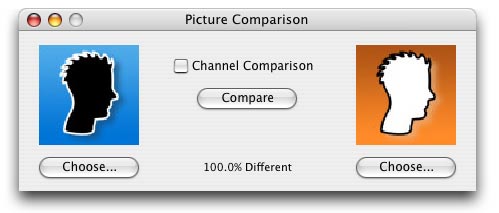
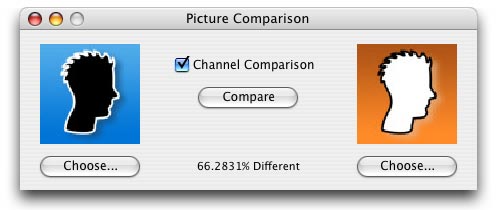
These two images are either 100% different, or 66.3%
How It Works
Function ComparePictures(p1 as picture, p2 as picture, ByRef percent as Double, UsingChannels as Boolean = False) As Boolean
   #pragma disableBackgroundTasks

   dim rgbs1, rgbs2 as rgbSurface
   dim x, y, width, height as integer
   dim total, difference as Integer


   // Pictures must be the same size
   if p1.Width <> p2.Width or p1.Height <> p2.Height then
      percent = 100
      return false
   end if

   // Get RGBSurfaces for Fast Manipulation
   rgbs1 = p1.rgBSurface
   rgbs2 = p2.rgBSurface
   width = p1.width
   height = p1.height
Below we calculate the total number of "test points." When doing a pixel comparison, the number of test points is simply the number of pixels, since either the pixels are the same or they aren't. However when doing channel comparison, a test point is a each single value of each channel of each pixel. So for each channel there are 255 points of measurement. If the channel's color value differs by only one point, 254 instead of 255 for example, the affect on the percentage difference is minute compared 0 differing from 255. // Get Total Points of Measurement
if UsingChannels then
total = 3 * 255 * width * height
else
total = width * height
end if
// Test Points
for x = width downto 0
for y = height downto 0
if rgbs1.pixel(x,y) = rgbs2.pixel(x,y) then
else
if UsingChannels then
difference = difference + Abs(rgbs1.pixel(x,y).Red - rgbs2.pixel(x,y).Red)
difference = difference + Abs(rgbs1.pixel(x,y).Green - rgbs2.pixel(x,y).Green)
difference = difference + Abs(rgbs1.pixel(x,y).Blue - rgbs2.pixel(x,y).Blue)
else
difference = difference + 1
end if
end if
next
next
   // Calculate percentage difference
   percent = difference / total * 100


   if difference = 0 then
      return true
   end if

   return false
End Function
Finished
|
 |
||
 |
 |
 |
|
 |






 |
 |
 |
||||||||||||||||||||||||||||||
 |
|
 |
||||||||||||||||||||||||||||||
 |
 |
 |
Maintained by the Staff of ResExcellence. This entire site ©1997-2006 ResExcellence
Privacy Statement? Sure we gotta Privacy Statement.
[an error occurred while processing this directive]