
Picture Comparison
In this tutorial we'll compare two images (of the same size) to each other and determine whether they are the same, or how different they are percentage-wise based on color values. There are two ways you can determine how an image differs, but there's only one way they can be the same. If two pictures are identical, then their pixel values exactly match, but to determine the degree of difference you have to decide whether you want the difference in pixels (if two pixels are not exactly the same, then the pixels themselves are 100% different) or you want to go further and test the actual color channels individually. With either test, when comparing a pure white image against a pure black image, it will give the same result: 100% different. If you test a pixel comparison with a pure white image and a pure gray (perfectly halfway between white and black) you'll the images are still 100% different. When using channel comparison however, they will be 50% different.
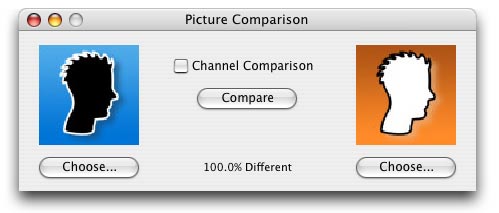
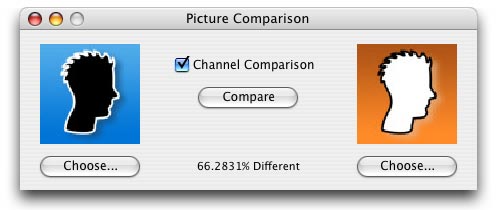


These two images are either 100% different, or 66.3%
different depending how you look at things.
How It Works
The function behind this process is actually quite simple. It takes four parameters, the two pictures to compare (if they're not the same size, the method returns instantly that they are 100% different), a ByRef parameter for the percentage of difference, and an optional parameter to toggle whether it should use pixel or channel comparison.
Function ComparePictures(p1 as picture, p2 as picture, ByRef percent as Double, UsingChannels as Boolean = False) As Boolean
   #pragma disableBackgroundTasks

   dim rgbs1, rgbs2 as rgbSurface
   dim x, y, width, height as integer
   dim total, difference as Integer


   // Pictures must be the same size
   if p1.Width <> p2.Width or p1.Height <> p2.Height then
      percent = 100
      return false
   end if

   // Get RGBSurfaces for Fast Manipulation
   rgbs1 = p1.rgBSurface
   rgbs2 = p2.rgBSurface
   width = p1.width
   height = p1.height
Here we're using an RGBSurface to test whether the images are the same or not as opposed to Graphics.Pixel since it is faster (though this has the requirement that the images must be full 32 bit images otherwise there won't be an RGBSurface).
Below we calculate the total number of "test points." When doing a pixel comparison, the number of test points is simply the number of pixels, since either the pixels are the same or they aren't. However when doing channel comparison, a test point is a each single value of each channel of each pixel. So for each channel there are 255 points of measurement. If the channel's color value differs by only one point, 254 instead of 255 for example, the affect on the percentage difference is minute compared 0 differing from 255.
   // Get Total Points of Measurement
   if UsingChannels then
      total = 3 * 255 * width * height
   else
      total = width * height
   end if


   // Test Points
   for x = width downto 0
      for y = height downto 0
         if rgbs1.pixel(x,y) = rgbs2.pixel(x,y) then
         else
            if UsingChannels then
               difference = difference + Abs(rgbs1.pixel(x,y).Red - rgbs2.pixel(x,y).Red)
               difference = difference + Abs(rgbs1.pixel(x,y).Green - rgbs2.pixel(x,y).Green)
               difference = difference + Abs(rgbs1.pixel(x,y).Blue - rgbs2.pixel(x,y).Blue)
            else
               difference = difference + 1
            end if
         end if
      next
   next
In the loop we simply go through every pixel in the images and do the comparison appropriately, and then finally we calculate the difference and return a handy boolean for whether they're exactly the same (true) or not (false).
   // Calculate percentage difference
   percent = difference / total * 100


   if difference = 0 then
      return true
   end if

   return false
End Function
Finished
There ya go! As always, you can download the project here.