
Translucent Drag Images
"No! Say it isn't so! That's impossible, isn't it?" It was until I figured it out!! For quite a while I wanted to make a REALbasic project that used translucent drags, but it was always going to be a loooot of work to do it, because you had to code everything by hand through declares, and I'm not even sure it would have been possible.
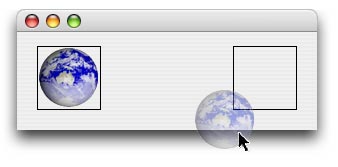
After lobbying for a .Handle property on the DragItem class, it was introduced in an update in REALbasic 5.5. Once it was added I started finishing work on the project and was annoyed when I kept finding it wasn't working. The drag would take place, but there wasn't any image. After talking to an Apple Engineer, he promised he'd look at it, and he did. About 6 months later he got back to me, and it turns out I had found a bug in Mac OS X, and there was a simple workaround as well! The problem? The image you use must have an alpha channel, which the JPEG image I was using, did not! Cured!
The Code
The code below is an extension of the DragItem class which we use like: drag.DragImage(MouseX, MouseY) = aPicture. The mouse coordinates are necessary to make the image appear at the correct offset. This code for this is quite simple thanks to the PNG Utilities plugin. The first ugly chunck are the declares necessary to make this work. After the declares, we first get the png pixel data from the picture by using the GetData method from the PNG Utilities function. We then use this data to create a CGImageRef (a reference to an image in CoreGraphics which is a part of Mac OS X's API). Below that, we setup an HIPoint (a datatype in the HIToolbox framework, another part of Mac OS X) that specifies the offset to show the image at, set the flag we use when specifying the drag image, and then we assign the drag image itself to the drag. Below that, we simply release the variables we created, something that we don't have to do in REALbasic because REALbasic makes our lives very easy. :^)
Sub DragImage(Extends drag as DragItem, MouseX as Integer, MouseY as Integer, Assigns pPic as Picture)
  Declare Function SetDragImageWithCGImage Lib Carbon (DragRef as Integer, _
    CGImageRef as Integer, HIPointOffset as Ptr, flags as Integer) as Integer
  Declare Function CGDataProviderCreateWithData Lib Carbon (info As Integer, data As Ptr, _
    size As Integer, releaseData As Integer) As Integer
  Declare Function CGImageCreateWithPNGDataProvider Lib Carbon (CFDataProviderRef as Integer, _
    NULL as Integer, Interpolate as Boolean, CGColorRenderingIntent as Integer) as Integer
  Declare Sub CFRelease Lib Carbon (ObjectRef as Integer)

  dim flags, err as Integer
  dim CGDataProviderRef, CGImageRef as Integer
  dim HIPoint, pngdata as MemoryBlock

  pngdata = PNGu.GetData(pPic)

  // Get CGImageRef
  CGDataProviderRef = CGDataProviderCreateWithData(0, pngdata, pngdata.Size, 0)
  CGImageRef = CGImageCreateWithPNGDataProvider(CGDataProviderRef, 0, true, 0) // kCGRenderingIntentDefault

  // Create Offset
  HIPoint = New MemoryBlock(8)
  HIPoint.SingleValue(0) = -MouseX
  HIPoint.SingleValue(4) = -MouseY

  // Set Flags
  flags = 8 // Show Image AND Region

  // Drag Image
  err = SetDragImageWithCGImage(drag.Handle, CGImageRef, HIPoint, flags)
  if err <> 0 then
    beep
    MsgBox "SetDragImageWithCGImage Error: " + str(err)
  end if

  // Release
  CFRelease(CGImageRef)
  CFRelease(CGDataProviderRef)
End Sub
Finished
That's ALL there is to it. Be forewarned though that this project only works in Mach-O built apps, so if you're using PEF, you'll have to do extra steps (which I don't know) to get it to work. As always, you can download the project here.