image ResEx Logo
ResExcellence www : Powered by Google
Cell Phone Themes Icons Mighty Mouse Cursors Software Reviews Widgets & Widgets

Articles
   3D
   Audio
   Custom Controls
   General RB
   Graphics
   Hacks
   Mac OS X
   Menus
   Novelty
   Printing
   REALbasic 2005
   REALbasic 2006
   Registration
   Resources
   Reviews
   Serial
   Speech
   Sockets
   XML
   Video
Resource Links
News
   Current News
   February 2006
   January 2006
   December 2005
   November 2005
   October 2005
   September 2005
   August 2005
   July 2005
   June 2005
   May 2005
   April 2005
   March 2005


REALbasic for Dummies
by Erick Tejkowski


Learning REALbasic through Applications
by Clayton E., Crooks II


REALbasic for Macintosh
by Michael Swaine


REALbasic Cross-Platform Application Development
by Mark S. Choate


Older files are in Stuffit 5 or greater format. Newer files are ".Zip". Download StuffIt Expander
Tell us about a bad link. Thank You!

Poofy Mac Poofster by Seth Willits
06-01-05

Printer Version


Mac OS X is All About the Poof!
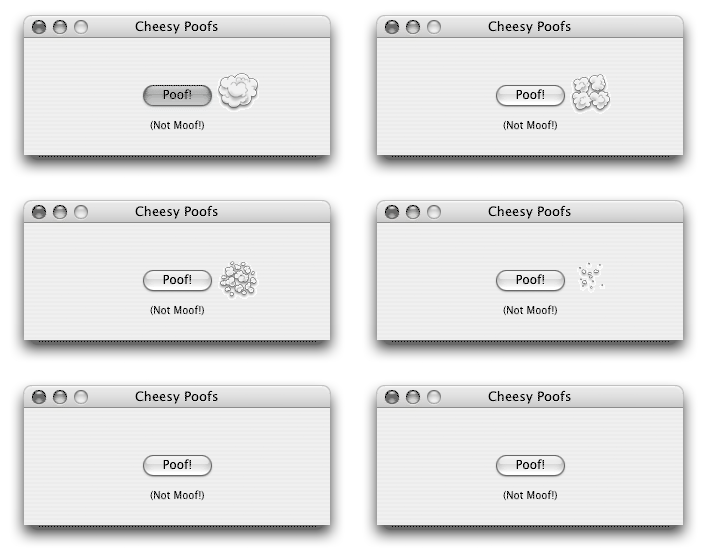
Let's face it: We all use Mac OS X because of that awesome little poof that appears when we drag stuff out of the toolbar or the Dock. We want poofs!


The Code
The poof is actually built-in to the Mac OS X Application Kit framework that is an integral part of Cocoa, one of the two major application APIs Apple provides for developers (the other being Carbon which REALbasic is built on top of). The setup code to use Cocoa in a REALbasic app is a discussion in its own right, so I'll skip all that and refer you to Charles Yeomans' wonderful e-book "I Declare: Calling External Functions in REALbasic". It should be noted that without Charles' book or his help, you wouldn't be reading this right now.

Alright, now setup code aside, the code is very simple. There's a function in the AppKit framework called "NSShowAnimationEffect" which is used to display an animation, one of them being a poof (no others are implemented). Just pass it the screen location (with 0, 0 being the bottom left), the type of effect, ignore the other stuff, and away you go!

Sub ShowPoofAtPoint(x as Integer, y as Integer)
  Const NSAnimationEffectPoof = 10
  Declare Sub NSShowAnimationEffect Lib CocoaLib _
    (NSAnimationEffect as Integer, _
    PointX as Integer, _
    PointY as Integer, _
    SizeW as Single, _
    SizeH as Single, _
    Null as Integer, _
    Null2 as Integer, _
    Null3 as Integer)
  dim point as MemoryBlock
  
  
  // Create the Point
  point = new MemoryBlock(8)
  point.SingleValue(0) = X
  point.SingleValue(4) = Screen(0).Height - Y
  
  NSShowAnimationEffect(NSAnimationEffectPoof, _
    point.Long(0), point.Long(4), 0, 0, 0, 0, 0)
End Sub


That's really all there is to it. It's amazing how stupidly simply it is, yet there's actually some complex stuff going on that we don't have to worry about because thankfully Charles has taken care of it for us. I strongly recommend you read Charles' book if you're intrigued by the topic. Charles even has a spell check panel working with an EditField!

Finished
I initially wanted to have this up on Saturday, but unfortunately I ran into some problems (silly and my fault). As always, you can download the project here.


Cell Phone Themes Icons Mighty Mouse Cursors Software Reviews Widgets & Widgets

Maintained by the Staff of ResExcellence. This entire site ©1997-2006 ResExcellence
Privacy Statement? Sure we gotta Privacy Statement. [an error occurred while processing this directive]