






 |
 |
 |
|
 |
||
 |

Articles 3D Audio Custom Controls General RB Graphics Hacks Mac OS X Menus Novelty Printing REALbasic 2005 REALbasic 2006 Registration Resources Reviews Serial Speech Sockets XML Video Resource Links News Current News February 2006 January 2006 December 2005 November 2005 October 2005 September 2005 August 2005 July 2005 June 2005 May 2005 April 2005 March 2005  REALbasic for Dummies by Erick Tejkowski  Learning REALbasic through Applications REALbasic for Macintosh REALbasic Cross-Platform Application Development 
Older files are in Stuffit 5 or greater format. Newer files are ".Zip". Download StuffIt Expander |

|
 
Using New Features From REALbasic 2005!
New Contextual Menu Events
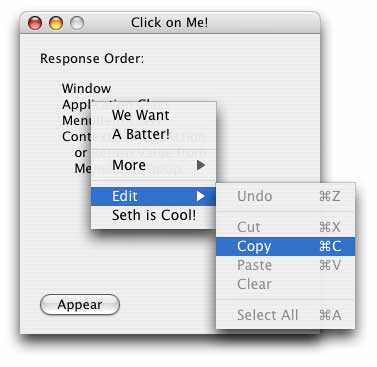
ConstructContextualMenu This Base parameter is the contextual menu itself. By adding items to Base, those items will appear in the contextual menu. X and Y are the location of the mouse when the click was made in the RectControl or Window in which this even is being fired. The return value from this even determines whether the control's parent's (or the window's if the control has no parent) ConstructContextualMenu event is fired as well. If you return true from the event, the menu is shown immediately. If you return false, then the parent gets a chance to add its menu items to the menu as well. After all the calling is done, Base will be displayed if it has at least one menu item in it. In the example project, if you click on the canvas in the window, it will add its one menu item to the contextual menu and then return false so that the window can add its items to it as well. This is a major advantage to this new design rather than the old icky ContexualMenu class.
ContextualMenuAction This HitItem parameter is the menu item the user selected. That's pretty self explanitory. The ContextualMenuAction event, however, is at the bottom of the menu handler chain for the selected item. When the user selects an item, the first place REALbasic looks for a menu handler is the window. If the window has a handler for the menu item (based on the Name property) then it calls it. If that handler returns false, all is well and the process stops. If it returns true, the application's menu handler for that item is called. If it returns true, the Action event in the MenuItem itself (if it's a MenuItem subclass) is called. If that returns true, then lastly, the ContextualMenuAction event is called. Pretty crazy! The project demonstrates how this works by randomly returning true or false so you can see how it would work in different situations.
MenuItem.Popup Method The Popup method is very simple.... it pops up the menu at the optionally-given screen coordinates. All of the handling behaves the same as specified above with exception that instead of a ContextualMenuAction event being called if the menu item is not handled anywhere else, that menu item is return as the result of the Popup method. If it was handled elsewhere, it returns nil.
Finished
|
 |
||
 |
 |
 |
|
 |




 |
 |
 |
||||||||||||||||||||||||||||||
 |
|
 |
||||||||||||||||||||||||||||||
 |
 |
 |
Maintained by the Staff of ResExcellence. This entire site ©1997-2006 ResExcellence
Privacy Statement? Sure we gotta Privacy Statement.
[an error occurred while processing this directive]