






 |
 |
 |
|
 |
 |
 |
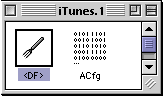
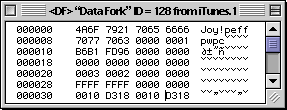
Changing iTunes Playlist Highlight Colors by Chris X With the growing number of submissions of iTunes Skins, I'd like to offer this how-to for editing the iTunes highlight and background colors in the playlist/ browse lists. These colors cannot be edited directly in ResEdit, because the color resources are "hidden" in the Data Fork, not the resource fork; so you'll need a hex editor. With the addition of the extension "Forker", ResEdit can read and edit data forks.
You'll also probably want some kind of color selector tool that will show RGB hex values so you can choose the replacement colors. Make a duplicate copy of iTunes and open its Data Fork with the hex editor.
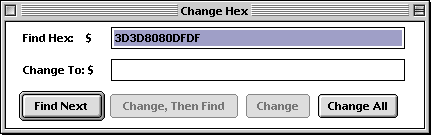
Using the hex editor's Search or Find function, locate the hex string for the part you want to change (Command-H in ResEdit).
Here are the RGB color values as they are valued in hex, each part of the RGB code is used twice together in hex:
Selected tune highlight: 3D3D 8080 DFDF (red=3D, green=80, blue=DF) Background light blue rows: EDED F3F3 FEFE Additional iTunes Edits:
|
 |
|
 |
 |
 |
|
 |




 |
 |
 |
||||||||||||||||||||||||||||||
 |
|
 |
||||||||||||||||||||||||||||||
 |
 |
 |
Maintained by the Staff of ResExcellence. This entire site ©1997-2006 ResExcellence
Privacy Statement? Sure we gotta Privacy Statement.
[an error occurred while processing this directive]