






 |
 |
 |
|
 |
||
 |

Articles 3D Audio Custom Controls General RB Graphics Hacks Mac OS X Menus Novelty Printing REALbasic 2005 REALbasic 2006 Registration Resources Reviews Serial Speech Sockets XML Video Resource Links News Current News February 2006 January 2006 December 2005 November 2005 October 2005 September 2005 August 2005 July 2005 June 2005 May 2005 April 2005 March 2005  REALbasic for Dummies by Erick Tejkowski  Learning REALbasic through Applications REALbasic for Macintosh REALbasic Cross-Platform Application Development 
Older files are in Stuffit 5 or greater format. Newer files are ".Zip". Download StuffIt Expander |

|
 
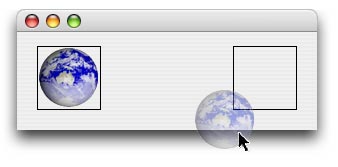
Translucent Drag Images
After lobbying for a .Handle property on the DragItem class, it was introduced in an update in REALbasic 5.5. Once it was added I started finishing work on the project and was annoyed when I kept finding it wasn't working. The drag would take place, but there wasn't any image. After talking to an Apple Engineer, he promised he'd look at it, and he did. About 6 months later he got back to me, and it turns out I had found a bug in Mac OS X, and there was a simple workaround as well! The problem? The image you use must have an alpha channel, which the JPEG image I was using, did not! Cured!
The Code
Sub DragImage(Extends drag as DragItem, MouseX as Integer, MouseY as Integer, Assigns pPic as Picture)
  Declare Function SetDragImageWithCGImage Lib Carbon (DragRef as Integer, _
    CGImageRef as Integer, HIPointOffset as Ptr, flags as Integer) as Integer
  Declare Function CGDataProviderCreateWithData Lib Carbon (info As Integer, data As Ptr, _
    size As Integer, releaseData As Integer) As Integer
  Declare Function CGImageCreateWithPNGDataProvider Lib Carbon (CFDataProviderRef as Integer, _
    NULL as Integer, Interpolate as Boolean, CGColorRenderingIntent as Integer) as Integer
  Declare Sub CFRelease Lib Carbon (ObjectRef as Integer)

  dim flags, err as Integer
  dim CGDataProviderRef, CGImageRef as Integer
  dim HIPoint, pngdata as MemoryBlock

  pngdata = PNGu.GetData(pPic)

  // Get CGImageRef
  CGDataProviderRef = CGDataProviderCreateWithData(0, pngdata, pngdata.Size, 0)
  CGImageRef = CGImageCreateWithPNGDataProvider(CGDataProviderRef, 0, true, 0) // kCGRenderingIntentDefault

  // Create Offset
  HIPoint = New MemoryBlock(8)
  HIPoint.SingleValue(0) = -MouseX
  HIPoint.SingleValue(4) = -MouseY

  // Set Flags
  flags = 8 // Show Image AND Region

  // Drag Image
  err = SetDragImageWithCGImage(drag.Handle, CGImageRef, HIPoint, flags)
  if err <> 0 then
    beep
    MsgBox "SetDragImageWithCGImage Error: " + str(err)
  end if

  // Release
  CFRelease(CGImageRef)
  CFRelease(CGDataProviderRef)
End Sub
Finished
|
 |
||
 |
 |
 |
|
 |




 |
 |
 |
||||||||||||||||||||||||||||||
 |
|
 |
||||||||||||||||||||||||||||||
 |
 |
 |
Maintained by the Staff of ResExcellence. This entire site ©1997-2006 ResExcellence
Privacy Statement? Sure we gotta Privacy Statement.
[an error occurred while processing this directive]